Index >> Business >> Office Suites & Tools >> Office Tab
Report SpywareOffice Tab 9.20

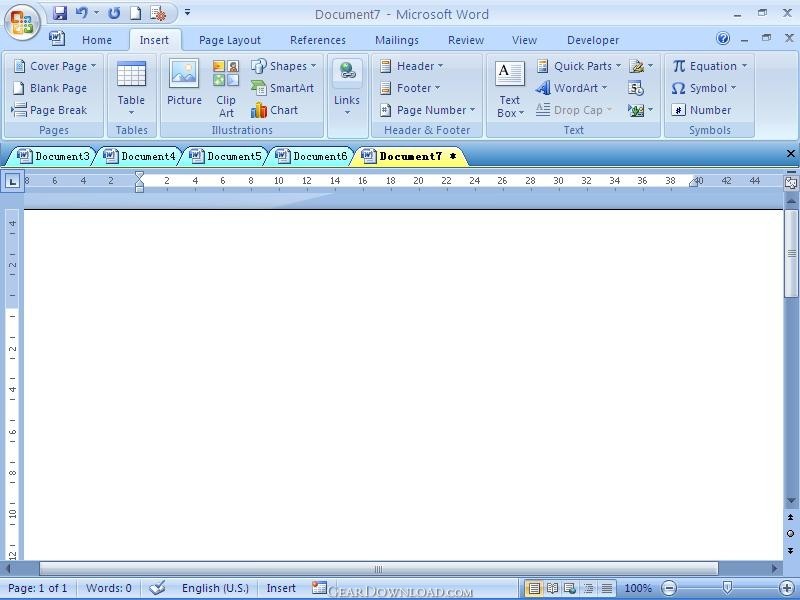 Click to enlarge screenshot
Software Description:
Office Tab - Tabbed Editing and Managing User Interface for Microsoft Office.
Unlike web browsers -- Internet Explorer 8/9/10, Firefox or Chrome, Microsoft Office does not use a single window to hold multiple files for viewing and editing. The product lines of Office Tab improve the ability of Office, and bring the tabbed user interface to Microsoft Office 2003, 2007, 2010 and 2013. it includes Tabs for Word, Excel and PowerPoint.
The tab can display the whole document name on the tab bar no matter how long the document name it is.
Open, read, edit and manage multiple documents in a tabbed window.
Using tabs for switching between documents.
Use Favorite Group new feature to manage groups of documents.
Easy to use, just like IE 8/9/10, Firefox and Chrome.
Without filling your desktop with new, unorganized Office windows.
Save all files in the tabbed window by one click.
Open current document or workbook in new window.
Open the relevant folder of current document.
Close all files in the tabbed windows (a confirmation dialog box will appear when you choose to close all files).
Close other files (exclude current file) in the tabbed windows.
You can close a tab by double-clicking left button or clicking the middle mouse button once.
You can create new document by double-clicking the left button on the blank space on the tab bar.
You don't need clicking Save As to save document as another file, just use Rename to change the name of document.
It brings you a group concept to manage your documents, you can easily open a group of documents, close a group of documents and you can also drag and drop the document between groups for organizing your favorites group.
System: Windows 8 (32/64), 7 (32/64), XP, Vista (32/64), Windows Server 2003 and 2008, Citrix System and Windows Terminal (Remote Desktop) Server.
Combine 32-bit and 64-bit supports into one single installation package, so that users don't need to know whether they are using 32-bit or 64-bit of Microsoft Office 2010/2013.
What's New: Support Office 2013 now.
Limitations: 30 Days Trial
Unlike web browsers -- Internet Explorer 8/9/10, Firefox or Chrome, Microsoft Office does not use a single window to hold multiple files for viewing and editing. The product lines of Office Tab improve the ability of Office, and bring the tabbed user interface to Microsoft Office 2003, 2007, 2010 and 2013. it includes Tabs for Word, Excel and PowerPoint.
The tab can display the whole document name on the tab bar no matter how long the document name it is.
Open, read, edit and manage multiple documents in a tabbed window.
Using tabs for switching between documents.
Use Favorite Group new feature to manage groups of documents.
Easy to use, just like IE 8/9/10, Firefox and Chrome.
Without filling your desktop with new, unorganized Office windows.
Save all files in the tabbed window by one click.
Open current document or workbook in new window.
Open the relevant folder of current document.
Close all files in the tabbed windows (a confirmation dialog box will appear when you choose to close all files).
Close other files (exclude current file) in the tabbed windows.
You can close a tab by double-clicking left button or clicking the middle mouse button once.
You can create new document by double-clicking the left button on the blank space on the tab bar.
You don't need clicking Save As to save document as another file, just use Rename to change the name of document.
It brings you a group concept to manage your documents, you can easily open a group of documents, close a group of documents and you can also drag and drop the document between groups for organizing your favorites group.
System: Windows 8 (32/64), 7 (32/64), XP, Vista (32/64), Windows Server 2003 and 2008, Citrix System and Windows Terminal (Remote Desktop) Server.
Combine 32-bit and 64-bit supports into one single installation package, so that users don't need to know whether they are using 32-bit or 64-bit of Microsoft Office 2010/2013.
What's New: Support Office 2013 now.
Limitations: 30 Days Trial
100% Clean:
 Office Tab 9.20 is 100% clean
This download (SetupOfficeTab.exe) was tested thoroughly and was found 100% clean. Click "Report Spyware" link on the top if you found this software contains any form of malware, including but not limited to: spyware, viruses, trojans and backdoors.
Related Software:
- Tabs for PowerPoint 8.50 - Microsoft PowerPoint - design multiple presentations in a tabbed window
- Excel Date Format Converter 1.20 - Excel Add-in convert the text format cells to date&time format cells.
- Office Tab Free Edition 8.5 - Free Office Tabs - Tabbed Editing and Managing for Microsoft Office
- Ribbon Finder for Office Professional Plus 2010 1.0.0.3 - Help use 10000 commands in Ribbon by searching multiple language keywords
- Ribbon Finder for Office Enterprise 2007 2.1.0.13 - Help you use 5000 commands in Ribbon by multiple language keywords
- Ribbon Finder for Office Home and Student 2007 2.1.0.13 - Help you search to use thousands of commands in Ribbon by searching keywords
- Ribbon Finder for Office Enterprise 2010 2.1.0.13 - Help you use more than thousands of commands in Ribbon by searching keywords
- Ribbon Finder for Office Home and Student 2010 1.0.0.3 - Help you use more than thousands of commands in Ribbon by searching keywords
- Tabs for PowerPoint 64bit 8.50 - Toggle many PowerPoint 2010 64-bit Presentation Windows via tabs in one Window
- Tabs for Visio 8.50 - Easily edit, read, and manage multiple visio files with tabbed browser in Visio
top 10 most downloaded


recommended software
-
- A VIP Organizer
- VIP Organizer is a time and task management software which uses To Do List method to help you get through more work spending less time. It increases y...

-
- Salon Calendar
- Salon Calendar is a software tool designed specially for hair salons, beauty, manicure or aesthetic shops, tanning salons, fitness studios, wedding sa...
