Index >> Business >> Office Suites & Tools >> Kanban Task Manager for Outlook
Report SpywareKanban Task Manager for Outlook 2

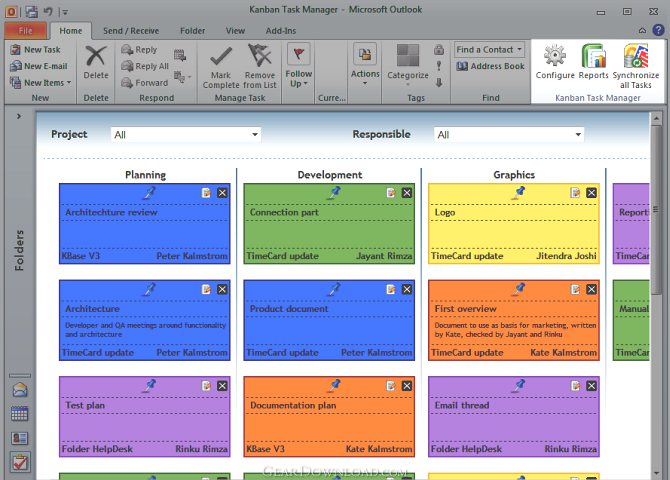 Click to enlarge screenshot
Software Description:
Kanban Task Manager for Outlook - Project and Task management inside Outlook, built on the Kanban board idea.
The traditional Kanban board uses cards that tell what and how much should be produced and when it should be done. With such a visual picture of the work process managers can quickly reveal bottlenecks and blockers. Less time is spent on trying to sort out how projects are coming along, because everything is visible on the Kanban board.
Moving the Kanban board into Outlook gives you everything in the computer, and no cards are lost because they fall to the floor or someone takes them away. On top of that the developers of kalmstrom.com Business Solutions have added several useful features:
Drag and drop tasks between different phases of a project.
Filter tasks by project and by member.
Automatic synchronization of tasks within the workgroup, so everything is always up to date and everyone can see what is happening.
Display of tasks for multiple projects in one Kanban board.
Kanban Task Manager uses as much standard Outlook features as possible, and therefore it is easy to understand and work with. The user interface is nice and colorful, and as many are already using Outlook there is no need to learn another system.
Kanban Task Manager works in an Outlook Task folder. When a user opens that folder he can reach the workgroup's different projects. The project he worked with last time will be open by default, and new projects and tasks can be created with a few simple steps.
With Kanban Task Manager all ongoing projects can be seen in Outlook on all PCs, and when one member of the group creates a new task, changes a task or drags it to another phase, the other team members can see it in their PCs also. Kanban Task Manager offers three alternatives on how to make this happen:
A Microsoft SharePoint site
A Microsoft SQL Server database
A Microsoft Access database
The SharePoint and SQL Server options require that the organization has a SharePoint site or SQL Server, in-house or hosted. The Access database is created by Kanban Task Manager.
What's New: Details pane, custom task tag, drag and drop tasks within phases, not only between them
Limitations: 30 Days Trial
The traditional Kanban board uses cards that tell what and how much should be produced and when it should be done. With such a visual picture of the work process managers can quickly reveal bottlenecks and blockers. Less time is spent on trying to sort out how projects are coming along, because everything is visible on the Kanban board.
Moving the Kanban board into Outlook gives you everything in the computer, and no cards are lost because they fall to the floor or someone takes them away. On top of that the developers of kalmstrom.com Business Solutions have added several useful features:
Drag and drop tasks between different phases of a project.
Filter tasks by project and by member.
Automatic synchronization of tasks within the workgroup, so everything is always up to date and everyone can see what is happening.
Display of tasks for multiple projects in one Kanban board.
Kanban Task Manager uses as much standard Outlook features as possible, and therefore it is easy to understand and work with. The user interface is nice and colorful, and as many are already using Outlook there is no need to learn another system.
Kanban Task Manager works in an Outlook Task folder. When a user opens that folder he can reach the workgroup's different projects. The project he worked with last time will be open by default, and new projects and tasks can be created with a few simple steps.
With Kanban Task Manager all ongoing projects can be seen in Outlook on all PCs, and when one member of the group creates a new task, changes a task or drags it to another phase, the other team members can see it in their PCs also. Kanban Task Manager offers three alternatives on how to make this happen:
A Microsoft SharePoint site
A Microsoft SQL Server database
A Microsoft Access database
The SharePoint and SQL Server options require that the organization has a SharePoint site or SQL Server, in-house or hosted. The Access database is created by Kanban Task Manager.
What's New: Details pane, custom task tag, drag and drop tasks within phases, not only between them
Limitations: 30 Days Trial
100% Clean:
 Kanban Task Manager for Outlook 2 is 100% clean
This download (KanbanTaskManagerSetup.msi) was tested thoroughly and was found 100% clean. Click "Report Spyware" link on the top if you found this software contains any form of malware, including but not limited to: spyware, viruses, trojans and backdoors.
Related Software:
- Calendar Browser 8 - Book resources as easily as you make an appointment in the Outlook Calendar.
- ExcelEverywhere for HTML 3.4.0 - Create WEB form that looks and functions the same as your MS Excel spreadsheet
- ONLYOFFICE Desktop Editor for Mac 4.1.1 - Open source office suite for working with text, spreadsheets and presentations.
- Grab Text 13.5 - Live text recognizer, capable of converting virtually anything to editable text!
- Amazing Visio for Microsoft Visio 4.0.2 - Add power to your Visio drawings with this tool set.
- novaPDF Lite 7.6.381 - novaPDF Lite allows you to easily create PDF files from any printable document.
- A-PDF Page Cut 5.1 - Break PDF pages to more pieces.
- ArtixMedia Menu Studio [Christmas Ed.] 3.71 - Create a gift multimedia CD-card to go with your presentations!
- Adds for Outlook 2.4 - Make an Alarm Clock and MP3 player from your Outlook!
- artiw outlook converter 4.5 - converts outlook/outlook express mail,contacts to pdf,chm,html,rtf,txt,xml etc
top 10 most downloaded


recommended software
-
- A VIP Organizer
- VIP Organizer is a time and task management software which uses To Do List method to help you get through more work spending less time. It increases y...

-
- Salon Calendar
- Salon Calendar is a software tool designed specially for hair salons, beauty, manicure or aesthetic shops, tanning salons, fitness studios, wedding sa...
