Index >> Business >> PIMS & Calendars >> dtNotes
Report SpywaredtNotes 3.2

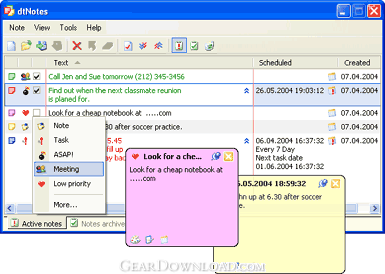 Click to enlarge screenshot
Software Description:
dtNotes - Put scraps of virtual paper on your desktop with the simplicity of pen and paper
Still putting sticky notes on your monitor? So was I. We have Mr. Fry to thank for his versatile invention. It was his bright idea to put scraps of paper on every thing around us in hopes of reminding us of our tasks later. I knew that software solutions provided a horde of useful features that good old paper clips lack. But, I'm a diehard Post-Its fan. Although I tried many software organizers, none of them was good enough to beat the simplicity of pen and paper.
However, when a new LCD monitor appeared on my table, I realized that it had no frame to which I could stick my paper notes! I had to find a replacement. And the miracle happened when I tried dtNotes. This incredible piece of software does exactly what I need it to do. When I need to make a note, I click a tray icon and a new virtual paper scrap appears on my desktop. No need to fill out any forms, answer any questions or select any properties. I just create a piece of virtual paper and type on it. As easy as making Post-It(r) notes or even easier (I type faster than I write!)
Though extremely easy-to-use, dtNotes is a powerful and feature-rich notes organizer. I personally had a bad habit of forgetting about my notes once written. With dtNotes, you won't miss a task. You can specify a time at which your note should start yelling. dtNotes also provides strong note management capabilities. You can manage your notes, flagging them as completed, archiving them, changing their priority, types, icons, etc. A built-in search will help you quickly find what you need. And, with a built-in Recycle Bin, you can easily recover mistakenly recycled notes. An automated backup mechanism won't even give you a chance to lose your notes.
Wipe the glue spots off your monitor's frame and forget about archaic paper scraps. Save some trees!
What's New: Multi-language interface Notes searching Flexible printing options
Limitations: 30 Days Trial; Notes types modification is disabled
Still putting sticky notes on your monitor? So was I. We have Mr. Fry to thank for his versatile invention. It was his bright idea to put scraps of paper on every thing around us in hopes of reminding us of our tasks later. I knew that software solutions provided a horde of useful features that good old paper clips lack. But, I'm a diehard Post-Its fan. Although I tried many software organizers, none of them was good enough to beat the simplicity of pen and paper.
However, when a new LCD monitor appeared on my table, I realized that it had no frame to which I could stick my paper notes! I had to find a replacement. And the miracle happened when I tried dtNotes. This incredible piece of software does exactly what I need it to do. When I need to make a note, I click a tray icon and a new virtual paper scrap appears on my desktop. No need to fill out any forms, answer any questions or select any properties. I just create a piece of virtual paper and type on it. As easy as making Post-It(r) notes or even easier (I type faster than I write!)
Though extremely easy-to-use, dtNotes is a powerful and feature-rich notes organizer. I personally had a bad habit of forgetting about my notes once written. With dtNotes, you won't miss a task. You can specify a time at which your note should start yelling. dtNotes also provides strong note management capabilities. You can manage your notes, flagging them as completed, archiving them, changing their priority, types, icons, etc. A built-in search will help you quickly find what you need. And, with a built-in Recycle Bin, you can easily recover mistakenly recycled notes. An automated backup mechanism won't even give you a chance to lose your notes.
Wipe the glue spots off your monitor's frame and forget about archaic paper scraps. Save some trees!
What's New: Multi-language interface Notes searching Flexible printing options
Limitations: 30 Days Trial; Notes types modification is disabled
100% Clean:
 dtNotes 3.2 is 100% clean
This download (dtnotes32.exe) was tested thoroughly and was found 100% clean. Click "Report Spyware" link on the top if you found this software contains any form of malware, including but not limited to: spyware, viruses, trojans and backdoors.
Related Software:
- Life Organizer 1.0 - Life Organizer enables individuals and families to organize their lives.
- NaturCalendar ST - Intuitive Desktop Calendar and Scheduler for Your PC.
- A Better Calendar 2.1.8 - Keep your notes, schedules and audio in classic "paper calendar" format.
- m9P Phonebook2 2.1 - Advanced Phonebook Manager!
- Our Scheduler 2.1.8 - The EASIEST and BEST wide range scheduling software available. Network Ready
- Tree Notes 3.064 - Notes organizer. Hierarchical notes manager that has a tree with icons.
- Visual eNote Desktop Edition 1.59 - One of the most popular, virtual-sticky-notes & reminder software for windows !
- Visual eNote Standard Edition 1.59 - One of the most popular, virtual-sticky-notes & reminder software for windows !
- Aml Pages 9.73b2654 - Aml Pages keeps all your notes, information, web pages, passwords, and etc
- EssentialPIM Pro 5.55 - Full-featured PIM offering Email, Synchronization, Portability, Network Support
top 10 most downloaded


recommended software
-
- A VIP Organizer
- VIP Organizer is a time and task management software which uses To Do List method to help you get through more work spending less time. It increases y...

-
- Salon Calendar
- Salon Calendar is a software tool designed specially for hair salons, beauty, manicure or aesthetic shops, tanning salons, fitness studios, wedding sa...
