Index >> Business >> Office Suites & Tools >> DocuGrab Word and PDF Search
Report SpywareDocuGrab Word and PDF Search 2.0.2

 Click to enlarge screenshot
Software Description:
DocuGrab Word and PDF Search - Search 1000's of Word, PDF and text documents; results returned instantly.
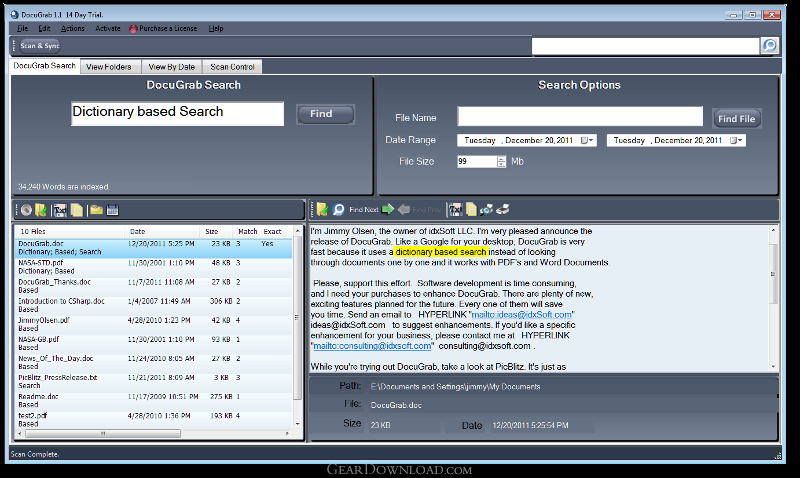
Search 1000's of MS Word, PDF and text documents; results are returned instantly. Tool-Tips aid the search, so even misspelled words can be found. Hover over the results, the viewer displays, scrolls to and highlights the matches. Double-click to open the file in any program you choose. A big time saver for users with large document archives; try it free for 30 days.
No matter how many documents you have, searches take only about a second. Much like an online search, results are returned in best match order. The process is safe: PDF, Word Documents, text files and user-specified files go through a one-time read-only scan where they are analyzed and added to a database/dictionary which can hold up to 45 million words. Rather than searching and reading the documents themselves, DocuGrab loads up their location, resulting in very fast searches. Documents can also be viewed by folder or date in a fashion similar to Windows Explorer, except much faster.
DocuGrab can be configured to work in almost any environment. The default scan of My Documents can be modified to look in any folder you choose, for any Word Document, PDF, or text-based file type. Each file type can have its own open-with program attached to it.
DocuGrab runs on Microsoft Windows 7, 8, Vista and XP. It is malware and virus-free, digitally signed by the author, idxSoft LLC and comes with a free 30 day trial.
What's New: New user interface, faster indexing, bug fixes.
Limitations: 30 Days Trial
TAGS: Find, Documents, Fast
Search 1000's of MS Word, PDF and text documents; results are returned instantly. Tool-Tips aid the search, so even misspelled words can be found. Hover over the results, the viewer displays, scrolls to and highlights the matches. Double-click to open the file in any program you choose. A big time saver for users with large document archives; try it free for 30 days.
No matter how many documents you have, searches take only about a second. Much like an online search, results are returned in best match order. The process is safe: PDF, Word Documents, text files and user-specified files go through a one-time read-only scan where they are analyzed and added to a database/dictionary which can hold up to 45 million words. Rather than searching and reading the documents themselves, DocuGrab loads up their location, resulting in very fast searches. Documents can also be viewed by folder or date in a fashion similar to Windows Explorer, except much faster.
DocuGrab can be configured to work in almost any environment. The default scan of My Documents can be modified to look in any folder you choose, for any Word Document, PDF, or text-based file type. Each file type can have its own open-with program attached to it.
DocuGrab runs on Microsoft Windows 7, 8, Vista and XP. It is malware and virus-free, digitally signed by the author, idxSoft LLC and comes with a free 30 day trial.
What's New: New user interface, faster indexing, bug fixes.
Limitations: 30 Days Trial
TAGS: Find, Documents, Fast
100% Clean:
 DocuGrab Word and PDF Search 2.0.2 is 100% clean
This download (DocuGrabSetup.exe) was tested thoroughly and was found 100% clean. Click "Report Spyware" link on the top if you found this software contains any form of malware, including but not limited to: spyware, viruses, trojans and backdoors.
Related Software:
- ExcelEverywhere for HTML 3.4.0 - Create WEB form that looks and functions the same as your MS Excel spreadsheet
- ONLYOFFICE Desktop Editor for Mac 4.1.1 - Open source office suite for working with text, spreadsheets and presentations.
- Grab Text 13.5 - Live text recognizer, capable of converting virtually anything to editable text!
- Amazing Visio for Microsoft Visio 4.0.2 - Add power to your Visio drawings with this tool set.
- novaPDF Lite 7.6.381 - novaPDF Lite allows you to easily create PDF files from any printable document.
- A-PDF Page Cut 5.1 - Break PDF pages to more pieces.
- ArtixMedia Menu Studio [Christmas Ed.] 3.71 - Create a gift multimedia CD-card to go with your presentations!
- Adds for Outlook 2.4 - Make an Alarm Clock and MP3 player from your Outlook!
- artiw outlook converter 4.5 - converts outlook/outlook express mail,contacts to pdf,chm,html,rtf,txt,xml etc
- Total Doc Converter 3.2 - Convert Doc to PDF, HTML, XLS, Image and Text Fast
top 10 most downloaded


recommended software
-
- A VIP Organizer
- VIP Organizer is a time and task management software which uses To Do List method to help you get through more work spending less time. It increases y...

-
- Salon Calendar
- Salon Calendar is a software tool designed specially for hair salons, beauty, manicure or aesthetic shops, tanning salons, fitness studios, wedding sa...
