Index >> Business >> Databases & Tools >> Database Exporter for Outlook
Report SpywareDatabase Exporter for Outlook 4.0

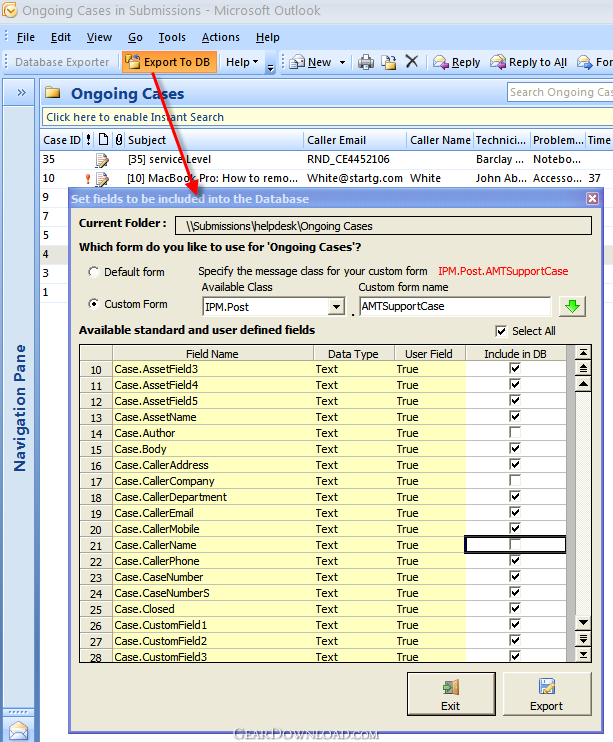 Click to enlarge screenshot
Software Description:
Database Exporter for Outlook - Export the contents of an Outlook folder to an external database
Database Exporter for Microsoft Outlook enables you to export the contents of an Outlook folder to an external database. It is especially designed to overcome the inability of the Outlook's built-in 'Import and Export Wizard' to handle data in custom forms, by allowing you to export any kind of data, including custom fields, to a database, in a simple click or automatically with the live export feature. You can selectively specify which fields to include in the export, and the appropriate data type will be inherited in the database. Optionally, you can also include all items in the subfolders for export, either to the same table or to separate table for each subfolder, with their unique set of fields. Supports export of mails, appointments, tasks, journals or contacts. It can operate on any Outlook form, field types and support any Outlook folder, whether a private folder or an Exchange Public Folder.
Introduced in version 2, is the real-time monitoring of any number of Outlook folders (can be a public folder or shared mailbox folder too). This will automatically process incoming mails or newly added appointments, tasks or contact items and export the data from the Outlook item to the database seamlessly, without any intervention from the user. It can also instantly update existing record in the database when the corresponding item in Outlook is edited and updated or changed. Automatic live export feature enables you to maintain synchronization between the Outlook items and the records in the database, on the fly, with no manual work. This spares you from having to do that laborious work of copying and pasting the data from Outlook to database manually
Refer to our extensive video demonstrations available on our website for a quick peek at this tool, and how it can automate data export from Outlook and be productive.
Limitations: 30 Days Trial
Database Exporter for Microsoft Outlook enables you to export the contents of an Outlook folder to an external database. It is especially designed to overcome the inability of the Outlook's built-in 'Import and Export Wizard' to handle data in custom forms, by allowing you to export any kind of data, including custom fields, to a database, in a simple click or automatically with the live export feature. You can selectively specify which fields to include in the export, and the appropriate data type will be inherited in the database. Optionally, you can also include all items in the subfolders for export, either to the same table or to separate table for each subfolder, with their unique set of fields. Supports export of mails, appointments, tasks, journals or contacts. It can operate on any Outlook form, field types and support any Outlook folder, whether a private folder or an Exchange Public Folder.
Introduced in version 2, is the real-time monitoring of any number of Outlook folders (can be a public folder or shared mailbox folder too). This will automatically process incoming mails or newly added appointments, tasks or contact items and export the data from the Outlook item to the database seamlessly, without any intervention from the user. It can also instantly update existing record in the database when the corresponding item in Outlook is edited and updated or changed. Automatic live export feature enables you to maintain synchronization between the Outlook items and the records in the database, on the fly, with no manual work. This spares you from having to do that laborious work of copying and pasting the data from Outlook to database manually
Refer to our extensive video demonstrations available on our website for a quick peek at this tool, and how it can automate data export from Outlook and be productive.
Limitations: 30 Days Trial
Feature List:
- Support pre-defined Outlook fields as well as custom fields defined for that folder
- Choose any customized form defined for that Outlook folder
- Supports POP, IMAP, Exchange mailbox and Public folders
- Exports the contents of the Outlook folder to a database
- Optionally include items from the subfolders in the export, either to a single table or to separate table for each subfolder
- Export all kind of Outlook items – mails, posts, appointments, tasks, journals or contacts
- Supports export of notes (Plain Body or HTML Body of the Outlook item, including task, appointment and contact item)
- Enumerated values for predefined Outlook fields are exported as readable values (e.g., Internal value for ‘Importance’ field of an Outlook item can be 0, 1 or 2. During export to a database, these values are translated to Normal, Low and High)
- No security warning from Outlook - Unlike other add-ins for Outlook, Database Exporter is designed to overcome the security warning that is usually displayed to the user if some third party application tries to access certain email address/body fields of an Outlook item
- Real-time monitoring of incoming emails/new items of an Outlook folder, and automatically export the data to a database
- Unicode Support
100% Clean:
 Database Exporter for Outlook 4.0 is 100% clean
This download (DatabaseExporterSetup.exe) was tested thoroughly and was found 100% clean. Click "Report Spyware" link on the top if you found this software contains any form of malware, including but not limited to: spyware, viruses, trojans and backdoors.
Related Software:
- OLAP Statistics and Reporting for Access 2.1 - OLAP tool to analyze Access data in multi-dimensional views in grids and charts.
- SQLite Analyzer 3.0.4.27 - Process SQLite databases visually with SQLite Analyzer! Free trial!
- Full Convert Professional SQL Server Ed. 1.3 - Full Convert provides powerful and comfortable way to convert databases.
- Full Convert Standard SQL Server Edition 1.3 - Full Convert provides powerful and comfortable way to convert databases.
- Full Convert Standard MySQL Edition 1.3 - Full Convert provides powerful and comfortable way to convert databases.
- Full Convert Professional MySQL Edition 1.3 - Full Convert provides powerful and comfortable way to convert databases.
- Mobile Database Viewer(Access,xls,Oracle)for UIQ 1.1 - View Access,Foxpro,dBase,Excel and any ODBC enable Database on UIQ mobile phone.
- Cornolius Database Application 1.4.300 - A secure multi-user database creator and manager for individuals and businesses!
- DBConvert for Access & MySQL 6.0.0 - Bi-directional db conversion tool for MS Access and MySQL databases
- SQL Data Examiner 2010 R2 4.1.0 - SQL compare and synchronization for SQL Server, Oracle, MySQL, SQL Azure, Acces.
top 10 most downloaded


recommended software
-
- A VIP Organizer
- VIP Organizer is a time and task management software which uses To Do List method to help you get through more work spending less time. It increases y...

-
- Salon Calendar
- Salon Calendar is a software tool designed specially for hair salons, beauty, manicure or aesthetic shops, tanning salons, fitness studios, wedding sa...
