Index >> Business >> Accounting & Finance >> Classic Menu for Excel 2010
Report SpywareClassic Menu for Excel 2010 5.00

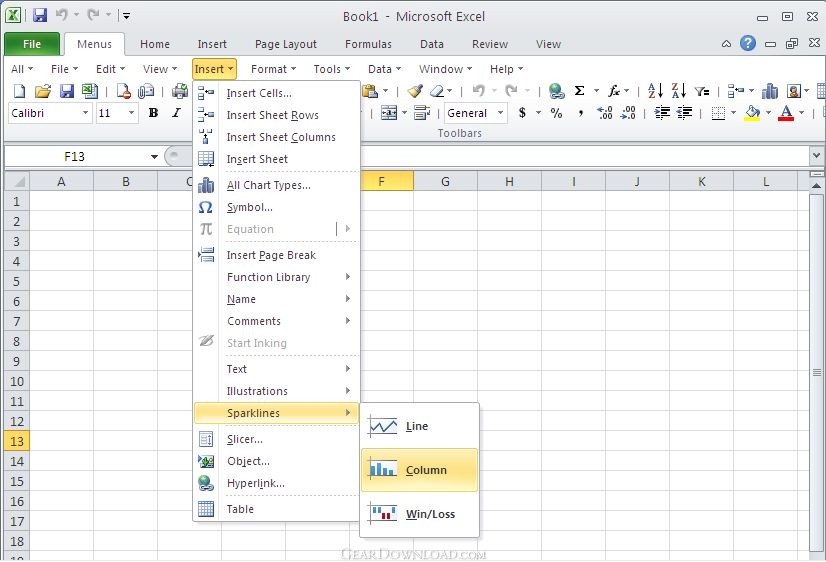 Click to enlarge screenshot
Software Description:
Classic Menu for Excel 2010 - Show Classic Menus and Toolbars on the Ribbon of Microsoft Excel 2010
Classic menu for Excel 2010 brings back Classic Menu to the new Ribbon of Microsoft Excel 2010 (32-bit and 64-bit). It is able to give you the best of both worlds: Classic Interface and Ribbon. The add-in for Excel adds a "Menus" tab between the "File" tab and "Home" tab on the Ribbon. By this tab, you can go to the familiar classic menu and toolbar. It allows you to work with Excel 2010 as if it were Excel 2003.
Classic Menu for Excel 2010 is a bridge between Microsoft Excel 2003 and Microsoft Excel 2010. It can help your employees deploy Excel 2010 immediately without any frustration. No training or tutor is needed for the new Excel 2010 with confusing Ribbon any longer.
Improve work efficiency: No more puzzles with the new scattered Ribbon, quickly get the exact buttons and menus and save time.
New Features: Not only remain the original toolbars and buttons of Excel 2003, but also contain all new functions of Microsoft Excel 2010, such as Spark lines.
Multi-Languages: Supports all languages that supported by Microsoft Office 2007: English, French, German, Italian, Spanish, Portuguese, Japanese, Arabic, Korean, Chinese, and more.
Fully compatible with Windows 7 32/64, Vista 32/64, XP 32/64, Windows 2003 and 2008 Server.
Combine 32-bit and 64-bit Classic Menu into one single Exe installation package, so that our customers don't need to know whether you are using 32-bit or 64-bit Microsoft Office 2010.
Easily show or hide Classic Menu and toolbars in Excel 2010;
The classic menu can stay at far right of Ribbon, or between "File" and "Home" tabs in Ribbon;
The Microsoft Excel 2003 interface can be positioned along with the Ribbon of Excel 2010 or you can completely overlay the latter.
Easily show or hide "Menus" tab in the Ribbon;
Original shortcuts are available. Press Alt-Q, and you can use the familiar keyboard shortcuts again.
Quickly find and execute the command that you want.
What's New: The recent files and recent folders command items have been included. Combine 32-bit and 64-bit Classic Menu into one single Exe installation package, so that our customers don't need to know whether you are using 32-bit or 64-bit Microsoft Office 2010.
Limitations: 30 Days Trial
Classic menu for Excel 2010 brings back Classic Menu to the new Ribbon of Microsoft Excel 2010 (32-bit and 64-bit). It is able to give you the best of both worlds: Classic Interface and Ribbon. The add-in for Excel adds a "Menus" tab between the "File" tab and "Home" tab on the Ribbon. By this tab, you can go to the familiar classic menu and toolbar. It allows you to work with Excel 2010 as if it were Excel 2003.
Classic Menu for Excel 2010 is a bridge between Microsoft Excel 2003 and Microsoft Excel 2010. It can help your employees deploy Excel 2010 immediately without any frustration. No training or tutor is needed for the new Excel 2010 with confusing Ribbon any longer.
Improve work efficiency: No more puzzles with the new scattered Ribbon, quickly get the exact buttons and menus and save time.
New Features: Not only remain the original toolbars and buttons of Excel 2003, but also contain all new functions of Microsoft Excel 2010, such as Spark lines.
Multi-Languages: Supports all languages that supported by Microsoft Office 2007: English, French, German, Italian, Spanish, Portuguese, Japanese, Arabic, Korean, Chinese, and more.
Fully compatible with Windows 7 32/64, Vista 32/64, XP 32/64, Windows 2003 and 2008 Server.
Combine 32-bit and 64-bit Classic Menu into one single Exe installation package, so that our customers don't need to know whether you are using 32-bit or 64-bit Microsoft Office 2010.
Easily show or hide Classic Menu and toolbars in Excel 2010;
The classic menu can stay at far right of Ribbon, or between "File" and "Home" tabs in Ribbon;
The Microsoft Excel 2003 interface can be positioned along with the Ribbon of Excel 2010 or you can completely overlay the latter.
Easily show or hide "Menus" tab in the Ribbon;
Original shortcuts are available. Press Alt-Q, and you can use the familiar keyboard shortcuts again.
Quickly find and execute the command that you want.
What's New: The recent files and recent folders command items have been included. Combine 32-bit and 64-bit Classic Menu into one single Exe installation package, so that our customers don't need to know whether you are using 32-bit or 64-bit Microsoft Office 2010.
Limitations: 30 Days Trial
100% Clean:
 Classic Menu for Excel 2010 5.00 is 100% clean
This download (ExcelMenu2010.exe) was tested thoroughly and was found 100% clean. Click "Report Spyware" link on the top if you found this software contains any form of malware, including but not limited to: spyware, viruses, trojans and backdoors.
Related Software:
- DownloaderXL Package 6.1.39 - Download free stock quotes, options, investment portfolio in Microsoft Excel
- Rolling Stock 2.8 - Vehicle and trip expense accounting and reporting
- Ezy Invoice 13.0.0.12 - Create and manage your Invoices, Quotes etc. Manage Inventory & Receivables
- Excel Invoice Template 2.2 - An Excel invoice template with order and inventory tracking and sales reporting.
- Business2Go Small Business 2.15 - Manage and organize your accounting needs.
- Employee Expense Organizer 4.2 - Employee expense management software for Windows..
- AceMoney 4.35 - Simple and flexible Personal Accounting Software
- kBilling - Invoice Software 3.9.0 - Create and email invoices, do subscription billing, track customers and contacts
- Real Option Valuation 2.2 - Valuing the strategic options embedded in your business project proposal.
- Excel Invoice Manager Enterprise 2.221025 - Billing software & invoice software based on Excel invoice template & databases
top 10 most downloaded


recommended software
-
- A VIP Organizer
- VIP Organizer is a time and task management software which uses To Do List method to help you get through more work spending less time. It increases y...

-
- Salon Calendar
- Salon Calendar is a software tool designed specially for hair salons, beauty, manicure or aesthetic shops, tanning salons, fitness studios, wedding sa...
