Index >> Business >> Math & Scientific Tools >> CalcExp Calculator&Unit Converter
Report SpywareCalcExp Calculator&Unit Converter 1.3

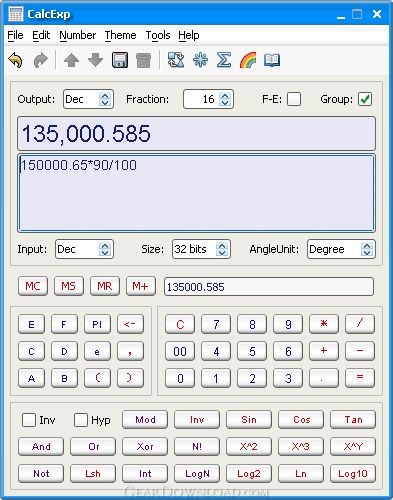 Click to enlarge screenshot
Software Description:
CalcExp Calculator&Unit Converter - A Scientific Calculator,Unit Converter,Currency Converter,and Color Converter.
CalcExp is designed as an alternative to the system build-in calculators. CalcExp runs on Windows 2K/XP/Vista, MacOsX, Linux, and Solaris. The main features are:
1. All-in-one Calculator:
Can be a good alternative to the system build-in calculators and hand-hold calculators. It makes your calculating faster and safer.
2. Powerful Number formatting:
You have many options to choose for formatting the result number, such as: Locales, Fraction Digits, Scientific Notation, Hexadecimal Displaying, etc, while the windows calculator can't do that for you!
3. Friendly User Interface:
Want it always stand on top? or want hide it as a systray icon? yes, you can do that.
Want unlimited undo/redo when editing the expression? Just press Ctrl+Z/Ctrl+Shift+Z.
Want record an expression, then recall it later? Save it in history list.
4. Skin Changeable:
7 Skins(themes) created by professional artists; the font is clear and easy to read.
5. Web Launch:
revolutionary startup manner: Web Launch. It allows you launch CalcExp in a web browser! With just one click, you can install/launch CalcExp on your computer, whatever you working on Windows, Linux, MacOsX, or Solaris.
6. Easy to Use:
View and Edit the expression directly; Avoid making mistakes to it.
7. Custom Functions:
You can define your own Functions and Constants, and use them later like system build-in functions/constants. It saves time and help you work more efficiently.
8. Fully Tested and Safe:
It has passed more than 1141 test cases to make sure your calculation is safe. It comes with a set of Bug Tracing Mechanism to help find any exceptions in calculating and report them to fix at once. This makes CalcExp become safer and safer.
9. Useful Tools:
A great feature of CalcExp is the useful tools, there are good friends in your work. There are 4 useful tools in CalcExp:Unit Converter, Currency Converter, Statistics Calculator, and Color Converter.
What's New: Fixed some bugs in unit convertors, eg: temperature etc; small numbers between 0 and 1 are correctly formatted according to its precision and exponential. JRE is dynamic bundled, so the installer is much smaller.
Limitations: 15 Days Trial; prompt registration when exiting, and prompt every 5 minutes for registration.
CalcExp is designed as an alternative to the system build-in calculators. CalcExp runs on Windows 2K/XP/Vista, MacOsX, Linux, and Solaris. The main features are:
1. All-in-one Calculator:
Can be a good alternative to the system build-in calculators and hand-hold calculators. It makes your calculating faster and safer.
2. Powerful Number formatting:
You have many options to choose for formatting the result number, such as: Locales, Fraction Digits, Scientific Notation, Hexadecimal Displaying, etc, while the windows calculator can't do that for you!
3. Friendly User Interface:
Want it always stand on top? or want hide it as a systray icon? yes, you can do that.
Want unlimited undo/redo when editing the expression? Just press Ctrl+Z/Ctrl+Shift+Z.
Want record an expression, then recall it later? Save it in history list.
4. Skin Changeable:
7 Skins(themes) created by professional artists; the font is clear and easy to read.
5. Web Launch:
revolutionary startup manner: Web Launch. It allows you launch CalcExp in a web browser! With just one click, you can install/launch CalcExp on your computer, whatever you working on Windows, Linux, MacOsX, or Solaris.
6. Easy to Use:
View and Edit the expression directly; Avoid making mistakes to it.
7. Custom Functions:
You can define your own Functions and Constants, and use them later like system build-in functions/constants. It saves time and help you work more efficiently.
8. Fully Tested and Safe:
It has passed more than 1141 test cases to make sure your calculation is safe. It comes with a set of Bug Tracing Mechanism to help find any exceptions in calculating and report them to fix at once. This makes CalcExp become safer and safer.
9. Useful Tools:
A great feature of CalcExp is the useful tools, there are good friends in your work. There are 4 useful tools in CalcExp:Unit Converter, Currency Converter, Statistics Calculator, and Color Converter.
What's New: Fixed some bugs in unit convertors, eg: temperature etc; small numbers between 0 and 1 are correctly formatted according to its precision and exponential. JRE is dynamic bundled, so the installer is much smaller.
Limitations: 15 Days Trial; prompt registration when exiting, and prompt every 5 minutes for registration.
100% Clean:
 CalcExp Calculator&Unit Converter 1.3 is 100% clean
This download (calcexp_windows_1_3_377_online.exe) was tested thoroughly and was found 100% clean. Click "Report Spyware" link on the top if you found this software contains any form of malware, including but not limited to: spyware, viruses, trojans and backdoors.
Related Software:
- ESBStats - Statistical Analysis Software 2.2.0 - Easy to use Statistical Analysis and Inference for Windows
- Regression Analysis and Forecasting 3.0 - Producing statistically sound value driver identification for forecasting data.
- Loan Tracker Software 5 - Amortization, Loan Tracker Software
- Function Grapher For Academic 3.9.1 - Graph maker to create 2d, 2.5d, 3D and 4d function graphs and animations.
- Energy Lens - Energy Management Software 1.6 - Helps businesses to save energy by discovering waste and improving efficiency.
- SpectrumSolvers 5.12.5 - Find best Spectral Estimation Method for a Power Spectral Density plot.
- FC-Win 5.00 - FC-Win (tm) is a front-end program for Fortran Calculus (tm)...Great Math Tool!
- Kool Swimming Pool Tool 1.0 - A cool tool to have before you plan a Swimming Pool
- Math Studio For Academic 2.8.1 - Math tool for school math teaching and studying.
- EasyFit 5.0 - Analyze your probability data and apply the results to make business decisions.
top 10 most downloaded


recommended software
-
- A VIP Organizer
- VIP Organizer is a time and task management software which uses To Do List method to help you get through more work spending less time. It increases y...

-
- Salon Calendar
- Salon Calendar is a software tool designed specially for hair salons, beauty, manicure or aesthetic shops, tanning salons, fitness studios, wedding sa...
