Index >> Business >> Project Management >> Biz Timesheet Manager
Report SpywareBiz Timesheet Manager 3.0.2520

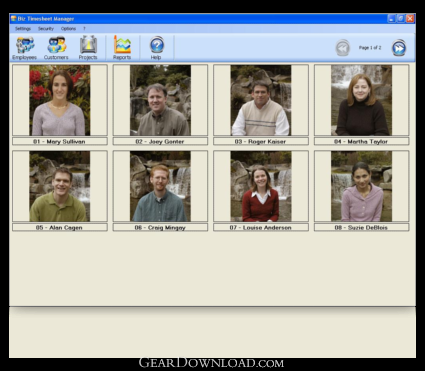 Click to enlarge screenshot
Software Description:
Biz Timesheet Manager - Track the time spent by your employees on your projects, jobs, contracts, etc.
Track and invoice the time and expenses spent by your employees on your projects, jobs, contracts, etc. Easy to use and affordable. All your employees will learn to use this program within a couple of minutes only.
No need for your employees to fill out time sheets by hand. Everything is now done automatically. You create your projects (jobs, service requests, internal tasks, administration, or any other sort of work) and your employees fill out their own time sheets directly on-screen - that's all there is to it!
A GENUINELY easy-to-use interface for all your employees. It will only take your employees one or two minutes each day to complete a normal time sheet (about 4 entries), so they won't lose any time in comparison to recording it on paper the traditional way.
You will have real-time access to labor time and costs for your projects. In just a few clicks you'll know just where you are. How long has been spent on a project? Who has worked on it? When? What do labor costs add up to so far? etc.
You can create your own project categories. For instance, you can create a special category for "S - Service requests" projects, one for "AD - Administration", one for "P - Long-term projects", another for "RD - Research and Development ", and so on. One advantage of such categories is that employees can easily find the project they are looking for when filling out their time sheet. And it means it is easier for you to check data and reports.
You can set up a series of different activity codes for each project category. For each project category you can create up to 30 different activity codes. Your employees select the activity code when creating their time sheet. For example, for the "Administration" project category, the activities codes could be: "Filing", "Invoicing", "Payroll", "Meeting". For the "Service requests" project category the codes could be for: "Travel", "Telephone support", "On-site support ", and so on.
What's New: Some features added. It's now possible to add parts to a project and to create fixed price projects. Some bug fixed.
Limitations: 30 Days Trial
Track and invoice the time and expenses spent by your employees on your projects, jobs, contracts, etc. Easy to use and affordable. All your employees will learn to use this program within a couple of minutes only.
No need for your employees to fill out time sheets by hand. Everything is now done automatically. You create your projects (jobs, service requests, internal tasks, administration, or any other sort of work) and your employees fill out their own time sheets directly on-screen - that's all there is to it!
A GENUINELY easy-to-use interface for all your employees. It will only take your employees one or two minutes each day to complete a normal time sheet (about 4 entries), so they won't lose any time in comparison to recording it on paper the traditional way.
You will have real-time access to labor time and costs for your projects. In just a few clicks you'll know just where you are. How long has been spent on a project? Who has worked on it? When? What do labor costs add up to so far? etc.
You can create your own project categories. For instance, you can create a special category for "S - Service requests" projects, one for "AD - Administration", one for "P - Long-term projects", another for "RD - Research and Development ", and so on. One advantage of such categories is that employees can easily find the project they are looking for when filling out their time sheet. And it means it is easier for you to check data and reports.
You can set up a series of different activity codes for each project category. For each project category you can create up to 30 different activity codes. Your employees select the activity code when creating their time sheet. For example, for the "Administration" project category, the activities codes could be: "Filing", "Invoicing", "Payroll", "Meeting". For the "Service requests" project category the codes could be for: "Travel", "Telephone support", "On-site support ", and so on.
What's New: Some features added. It's now possible to add parts to a project and to create fixed price projects. Some bug fixed.
Limitations: 30 Days Trial
100% Clean:
 Biz Timesheet Manager 3.0.2520 is 100% clean
This download (BizTimesheetSetup30.exe) was tested thoroughly and was found 100% clean. Click "Report Spyware" link on the top if you found this software contains any form of malware, including but not limited to: spyware, viruses, trojans and backdoors.
Related Software:
- Office Manager 12.0 - The Office Manager is a versatile, easy-to-configure and powerful DMS.
- Simple Scheduling Calendar 1.24 - Schedule your employees to shifts and tasks on a simple calendar for a month.
- Schedule Multiple Shifts Automatically 7.11 - Automatic Monthly Shift Schedules for 10 Shifts and 50 Employees with Excel.
- Rotating Shift Schedules for Your People 5.24 - Rotating or Fixed Shift Schedules for 10 People for 52 Weeks with Excel.
- Complex Shift Schedules for 25 People 6.72 - Complex Shift Schedules for 25 People with Excel.
- Assign Multiple Daily Tasks to 20 People 8.15 - Assign Multiple Daily tasks to 20 Employees with Excel
- Schedule Split Shifts for 25 Employees 6.8 - Assign Daily Split Shifts to 25 Employees with Excel.
- Daily Shifts and Tasks for 25 Employees 3.98 - Create daily shift and task schedules for one week with Excel spreadsheet.
- Daily Calls and Tasks for 20 Doctors 1.85 - Schedule 4 daily calls and 50 daily tasks to 20 doctors for one year.
- Doctors Calls for a Year with Excel 4.16 - Excel spreadsheet for assigning up to 5 daily calls to 25 doctors for one year.
top 10 most downloaded


recommended software
-
- A VIP Organizer
- VIP Organizer is a time and task management software which uses To Do List method to help you get through more work spending less time. It increases y...

-
- Salon Calendar
- Salon Calendar is a software tool designed specially for hair salons, beauty, manicure or aesthetic shops, tanning salons, fitness studios, wedding sa...
