Index >> Business >> Office Suites & Tools >> AVCWare PPT to DVD Converter Personal
Report SpywareAVCWare PPT to DVD Converter Personal 1.0.1.0920

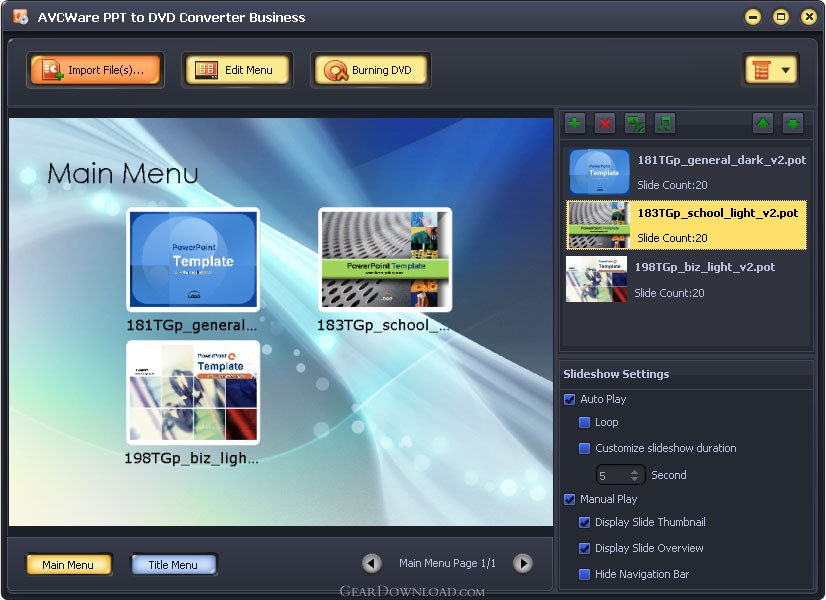 Click to enlarge screenshot
Software Description:
AVCWare PPT to DVD Converter Personal - Convert most popular PPT formats to DVD discs, DVD folder as well as ISO files.
Powerful and convenient, AVCWare PPT to DVD Converter Personal is your best choice to help you convert PPT files into DVD with great efficiency and superior quality. It enables you to convert most popular PPT formats like ppt, pptx, pptm, ppsx, pps, ppsm, potx, potm and pot to DVD discs, DVD folder as well as ISO files. Besides, multiple DVD formats are fully supported, including DVD-R, DVD+R, DVD-RW, DVD+RW, DVD+R DL, DVD-R DL, DVD-5 and DVD-9.
Functions
1.Most common-used PPT formats can be converted to DVD with fine quality and high speed, including ppt, pptx, pptm, ppsx, pps, ppsm, potx, potm and pot.
2.To satisfy different demands, it allows you to convert PPTs to ISO files and DVD folder besides DVD disc.
3.Support various DVD formats, including DVD-R, DVD+R, DVD-RW, DVD+RW, DVD+R DL, DVD-R DL, DVD-5 and DVD-9.
4.You can design DVD menus with dozens of menu templates and you can also add background music and picture into the menu.
5.It enables you to record commentary on PPTs during rehearsing and you can also design your PPTs by adding favorite background music or stylish watermark.
6.In auto-play mode, loop play is available and there's no need to flip slides one by one when playing a PPT in DVD player. While in manual-play mode, you can stop at any slide as you wish to make further explanations.
7.Two slide lists are provided when playing PPTs in a DVD player: thumbnail list and outline list which qualifies you to view any slide easily and fast. Manual playing mode only.
8.You can set parameters, like TV standards, aspect ratio, video quality, volume label, write speed, copy numbers to modify the output of target DVD.
9.Auto-exit, shut down, stands by, hibernate the system or just do nothing after DVD creation.
10.English, German, Spanish, French, Italian, Japanese, Simplified and Traditional Chinese interface languages are optional.
Powerful and convenient, AVCWare PPT to DVD Converter Personal is your best choice to help you convert PPT files into DVD with great efficiency and superior quality. It enables you to convert most popular PPT formats like ppt, pptx, pptm, ppsx, pps, ppsm, potx, potm and pot to DVD discs, DVD folder as well as ISO files. Besides, multiple DVD formats are fully supported, including DVD-R, DVD+R, DVD-RW, DVD+RW, DVD+R DL, DVD-R DL, DVD-5 and DVD-9.
Functions
1.Most common-used PPT formats can be converted to DVD with fine quality and high speed, including ppt, pptx, pptm, ppsx, pps, ppsm, potx, potm and pot.
2.To satisfy different demands, it allows you to convert PPTs to ISO files and DVD folder besides DVD disc.
3.Support various DVD formats, including DVD-R, DVD+R, DVD-RW, DVD+RW, DVD+R DL, DVD-R DL, DVD-5 and DVD-9.
4.You can design DVD menus with dozens of menu templates and you can also add background music and picture into the menu.
5.It enables you to record commentary on PPTs during rehearsing and you can also design your PPTs by adding favorite background music or stylish watermark.
6.In auto-play mode, loop play is available and there's no need to flip slides one by one when playing a PPT in DVD player. While in manual-play mode, you can stop at any slide as you wish to make further explanations.
7.Two slide lists are provided when playing PPTs in a DVD player: thumbnail list and outline list which qualifies you to view any slide easily and fast. Manual playing mode only.
8.You can set parameters, like TV standards, aspect ratio, video quality, volume label, write speed, copy numbers to modify the output of target DVD.
9.Auto-exit, shut down, stands by, hibernate the system or just do nothing after DVD creation.
10.English, German, Spanish, French, Italian, Japanese, Simplified and Traditional Chinese interface languages are optional.
Feature List:
- Most common-used PPT formats can be converted to DVD with fine quality and high speed, including ppt, pptx, pptm, ppsx, pps, ppsm, potx, potm and pot
- To satisfy different demands, it allows you to convert PPTs to ISO files and DVD folder besides DVD disc
- Support various DVD formats, including DVD-R, DVD+R, DVD-RW, DVD+RW, DVD+R DL, DVD-R DL, DVD-5 and DVD-9
- You can design DVD menus with dozens of menu templates and you can also add background music and picture into the menu
- It enables you to record commentary on PPTs during rehearsing and you can also design your PPTs by adding favorite background music or stylish watermark
- In auto-play mode, loop play is available and there's no need to flip slides one by one when playing a PPT in DVD player. While in manual-play mode, you can stop at any slide as you wish to make further explanations
- Two slide lists are provided when playing PPTs in a DVD player: thumbnail list and outline list which qualifies you to view any slide easily and fast. Manual playing mode only
- You can set parameters, like TV standards, aspect ratio, video quality, volume label, write speed, copy numbers to modify the output of target DVD
- Auto-exit, shut down, stands by, hibernate the system or just do nothing after DVD creation
- English, German, Spanish, French, Italian, Japanese, Simplified and Traditional Chinese interface languages are optional
100% Clean:
 AVCWare PPT to DVD Converter Personal 1.0.1.0920 is 100% clean
This download (avc-ppt-to-dvd-converter.exe) was tested thoroughly and was found 100% clean. Click "Report Spyware" link on the top if you found this software contains any form of malware, including but not limited to: spyware, viruses, trojans and backdoors.
Related Software:
- ExcelEverywhere for HTML 3.4.0 - Create WEB form that looks and functions the same as your MS Excel spreadsheet
- ONLYOFFICE Desktop Editor for Mac 4.1.1 - Open source office suite for working with text, spreadsheets and presentations.
- Grab Text 13.5 - Live text recognizer, capable of converting virtually anything to editable text!
- Amazing Visio for Microsoft Visio 4.0.2 - Add power to your Visio drawings with this tool set.
- novaPDF Lite 7.6.381 - novaPDF Lite allows you to easily create PDF files from any printable document.
- A-PDF Page Cut 5.1 - Break PDF pages to more pieces.
- ArtixMedia Menu Studio [Christmas Ed.] 3.71 - Create a gift multimedia CD-card to go with your presentations!
- Adds for Outlook 2.4 - Make an Alarm Clock and MP3 player from your Outlook!
- artiw outlook converter 4.5 - converts outlook/outlook express mail,contacts to pdf,chm,html,rtf,txt,xml etc
- Total Doc Converter 3.2 - Convert Doc to PDF, HTML, XLS, Image and Text Fast
top 10 most downloaded


recommended software
-
- A VIP Organizer
- VIP Organizer is a time and task management software which uses To Do List method to help you get through more work spending less time. It increases y...

-
- Salon Calendar
- Salon Calendar is a software tool designed specially for hair salons, beauty, manicure or aesthetic shops, tanning salons, fitness studios, wedding sa...
