Index >> Business >> Office Suites & Tools >> Answer It! add-in for Microsoft Outlook
Report SpywareAnswer It! add-in for Microsoft Outlook 2007

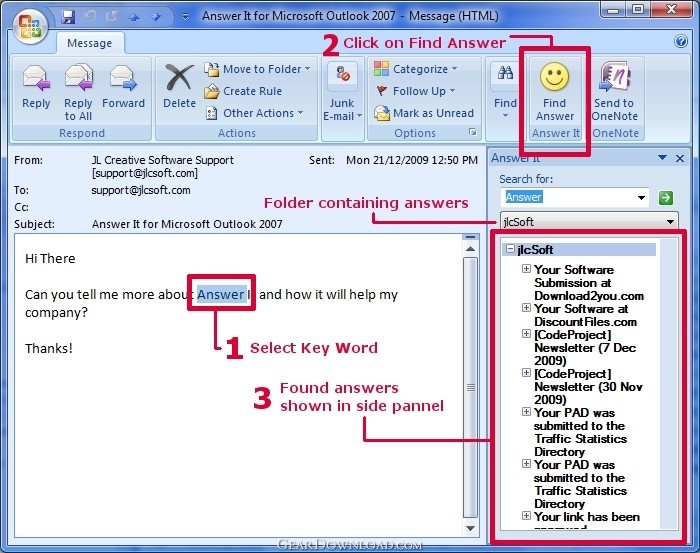 Click to enlarge screenshot
Software Description:
Answer It! add-in for Microsoft Outlook - The Answer It! for MS Outlook 2007 is the perfect solution for quick answers!
Answer It! Add-in for MS Outlook 2007 is the perfect solution for individuals and enterprises who receive emails asking questions that require consistent, comprehensive and quick answers.
Answer It! allows you to build a library of answers to frequently asked questions right within Microsoft Outlook. By highlighting any search term in a received email message and selecting “Find Answer” from the ribbon bar, you can quickly locate all your previous responses that contain the search term. Answers appear in their own list inside the Outlook email read pane. These answers can then be used to create a reply or new email to the sender. You can also drag and drop or copy the answers to the clipboard. Answers can even contain attachments so that you are not constantly searching for files on your hard drive.
Any Outlook item can be used as a source for the answers, but Answer It! also allows you to create Answer It folders and items. These Answer It! custom items allow you to assign keywords to your answers, enhancing Answer It!’s search ability. To create a new Answer It folder, simply open the Answer It! tab from Tools->Options inside Microsoft Outlook and select "New Answer Folder".
Installing the software is simple. Just download it and run the installation program. Once installed, start Outlook and Answer It! will prompt you to select or create a folder for your answers. You can add more at anytime from the Answer It! tab under Tools->Options inside Microsoft Outlook.
Limitations: 30 Days Trial
TAGS: Answer, Add-in, addin
Answer It! Add-in for MS Outlook 2007 is the perfect solution for individuals and enterprises who receive emails asking questions that require consistent, comprehensive and quick answers.
Answer It! allows you to build a library of answers to frequently asked questions right within Microsoft Outlook. By highlighting any search term in a received email message and selecting “Find Answer” from the ribbon bar, you can quickly locate all your previous responses that contain the search term. Answers appear in their own list inside the Outlook email read pane. These answers can then be used to create a reply or new email to the sender. You can also drag and drop or copy the answers to the clipboard. Answers can even contain attachments so that you are not constantly searching for files on your hard drive.
Any Outlook item can be used as a source for the answers, but Answer It! also allows you to create Answer It folders and items. These Answer It! custom items allow you to assign keywords to your answers, enhancing Answer It!’s search ability. To create a new Answer It folder, simply open the Answer It! tab from Tools->Options inside Microsoft Outlook and select "New Answer Folder".
Installing the software is simple. Just download it and run the installation program. Once installed, start Outlook and Answer It! will prompt you to select or create a folder for your answers. You can add more at anytime from the Answer It! tab under Tools->Options inside Microsoft Outlook.
Limitations: 30 Days Trial
TAGS: Answer, Add-in, addin
100% Clean:
 Answer It! add-in for Microsoft Outlook 2007 is 100% clean
This download (AnswerIt-Setup.exe) was tested thoroughly and was found 100% clean. Click "Report Spyware" link on the top if you found this software contains any form of malware, including but not limited to: spyware, viruses, trojans and backdoors.
Related Software:
- Merge It! add-in for Microsoft Outlook 2007 - Merge It! for Outlook 2007 is for sending personalized emails to many recipients
- ExcelEverywhere for HTML 3.4.0 - Create WEB form that looks and functions the same as your MS Excel spreadsheet
- ONLYOFFICE Desktop Editor for Mac 4.1.1 - Open source office suite for working with text, spreadsheets and presentations.
- Grab Text 13.5 - Live text recognizer, capable of converting virtually anything to editable text!
- Amazing Visio for Microsoft Visio 4.0.2 - Add power to your Visio drawings with this tool set.
- novaPDF Lite 7.6.381 - novaPDF Lite allows you to easily create PDF files from any printable document.
- A-PDF Page Cut 5.1 - Break PDF pages to more pieces.
- ArtixMedia Menu Studio [Christmas Ed.] 3.71 - Create a gift multimedia CD-card to go with your presentations!
- Adds for Outlook 2.4 - Make an Alarm Clock and MP3 player from your Outlook!
- artiw outlook converter 4.5 - converts outlook/outlook express mail,contacts to pdf,chm,html,rtf,txt,xml etc
top 10 most downloaded


recommended software
-
- A VIP Organizer
- VIP Organizer is a time and task management software which uses To Do List method to help you get through more work spending less time. It increases y...

-
- Salon Calendar
- Salon Calendar is a software tool designed specially for hair salons, beauty, manicure or aesthetic shops, tanning salons, fitness studios, wedding sa...
