Index >> Business >> Office Suites & Tools >> Access Recovery Toolbox
Report SpywareAccess Recovery Toolbox 2.0.2

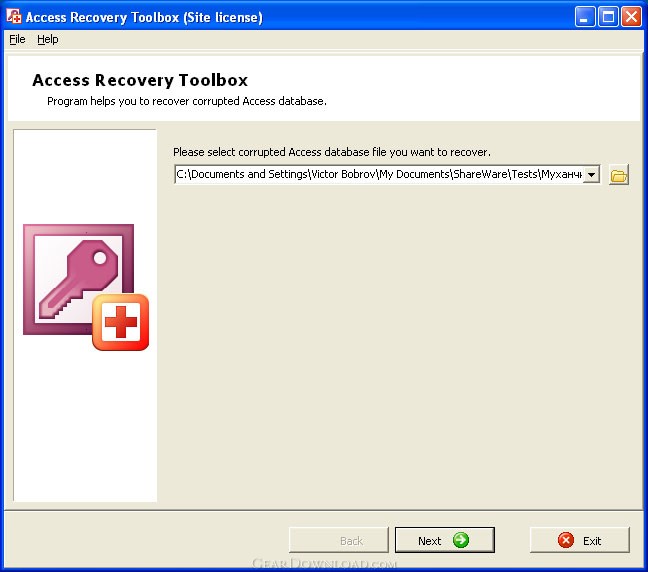 Click to enlarge screenshot
Software Description:
Access Recovery Toolbox - Repairs damaged databases of MS Access format, converting into clean files
Stop worrying if some databases of Microsoft Access format get out of order and it is not possible to get another copy of affected data, you may easily fix the corruption of MDB files by applying Access Recovery Toolbox. The MS Access repair service is easy to use, the analysis of corrupted databases can be started in a minute right after the download of Access Recovery Toolbox binaries. Thanks to the powerful database recovery service, provided by this application, you may apply Access Recovery Toolbox in all instances of MDB and ACCDB corruption, there is no need to look for the root cause of data corruption issue in your case. Access Recovery Toolbox provides the automation of all data recovery activities, so you should select the input document to be processed it is all you need. Please get the installer of Access Recovery Toolbox on your PC as soon as you encounter data corruption issues and click it to proceed like you do it with any other PC utility designed for the Microsoft Windows operating system. The friendly interface of Access Recovery Toolbox allows starting the analysis of ACCDB databases within several seconds after the installation of MDB recovery tool, just follow the directions of MS Access restore application, evaluate the interface of Access Recovery Toolbox and prepare to select a database of supported format to be parsed. Some kind of additional settings are absent so you may quickly start the recovery itself by clicking the Next softkey, it is possible if you have already checked the path to corrupted databases and it is correct. The speed of MS Access recovery depends on the speed of CPU in use but you may improve this factor by disabling other applications, running on your computer. Do not worry about the speed of Access Recovery Toolbox, this factor does not influence the efficiency of MS Access recovery so you may get the best results of analysis even on slower PC workstations.
Read more: http://www.msaccessrecoverytoolbox.com/
What's New: Was improved a recovering Access 2007 / 2010 files.
Limitations: Can't save recovered data.
Stop worrying if some databases of Microsoft Access format get out of order and it is not possible to get another copy of affected data, you may easily fix the corruption of MDB files by applying Access Recovery Toolbox. The MS Access repair service is easy to use, the analysis of corrupted databases can be started in a minute right after the download of Access Recovery Toolbox binaries. Thanks to the powerful database recovery service, provided by this application, you may apply Access Recovery Toolbox in all instances of MDB and ACCDB corruption, there is no need to look for the root cause of data corruption issue in your case. Access Recovery Toolbox provides the automation of all data recovery activities, so you should select the input document to be processed it is all you need. Please get the installer of Access Recovery Toolbox on your PC as soon as you encounter data corruption issues and click it to proceed like you do it with any other PC utility designed for the Microsoft Windows operating system. The friendly interface of Access Recovery Toolbox allows starting the analysis of ACCDB databases within several seconds after the installation of MDB recovery tool, just follow the directions of MS Access restore application, evaluate the interface of Access Recovery Toolbox and prepare to select a database of supported format to be parsed. Some kind of additional settings are absent so you may quickly start the recovery itself by clicking the Next softkey, it is possible if you have already checked the path to corrupted databases and it is correct. The speed of MS Access recovery depends on the speed of CPU in use but you may improve this factor by disabling other applications, running on your computer. Do not worry about the speed of Access Recovery Toolbox, this factor does not influence the efficiency of MS Access recovery so you may get the best results of analysis even on slower PC workstations.
Read more: http://www.msaccessrecoverytoolbox.com/
What's New: Was improved a recovering Access 2007 / 2010 files.
Limitations: Can't save recovered data.
Feature List:
- Reading data from the source database: system tables (their structure and data), tables created by the user, information about relations and queries, identifying all data that can be recovered and writing them to the computer memory. While creating the new database, the program copies the structure of the source file as closely as possible and all uncorrupted data stored in it
- Analyzing the read data: while recovering the database from the information read from the source file, the program restores relations between tables, the structure of user tables (field names and types, indexes) and the structure of queries (used tables and table fields, conditions, relations between tables used in the query). It also checks the integrity of tables and indexes, in case the integrity of indexes, the structures of table or query relations are corrupted, the program displays an error message (displayed in the log window)
- Recovering information: it creates a new database specified by the user. It creates tables, queries and relations in this database according to the information obtained as a result of the analysis. Data with errors is not copied. It copies records from the tables of the source database to the tables of the target database
100% Clean:
 Access Recovery Toolbox 2.0.2 is 100% clean
This download (Access-Recovery-Toolbox-01-Setup.exe) was tested thoroughly and was found 100% clean. Click "Report Spyware" link on the top if you found this software contains any form of malware, including but not limited to: spyware, viruses, trojans and backdoors.
Related Software:
- OneNote Recovery Toolbox 2.0.0 - Repairs OneNote documents of ONE supported format on all computers
- ExcelEverywhere for HTML 3.4.0 - Create WEB form that looks and functions the same as your MS Excel spreadsheet
- ONLYOFFICE Desktop Editor for Mac 4.1.1 - Open source office suite for working with text, spreadsheets and presentations.
- Grab Text 13.5 - Live text recognizer, capable of converting virtually anything to editable text!
- Amazing Visio for Microsoft Visio 4.0.2 - Add power to your Visio drawings with this tool set.
- novaPDF Lite 7.6.381 - novaPDF Lite allows you to easily create PDF files from any printable document.
- A-PDF Page Cut 5.1 - Break PDF pages to more pieces.
- ArtixMedia Menu Studio [Christmas Ed.] 3.71 - Create a gift multimedia CD-card to go with your presentations!
- Adds for Outlook 2.4 - Make an Alarm Clock and MP3 player from your Outlook!
- artiw outlook converter 4.5 - converts outlook/outlook express mail,contacts to pdf,chm,html,rtf,txt,xml etc
top 10 most downloaded


recommended software
-
- A VIP Organizer
- VIP Organizer is a time and task management software which uses To Do List method to help you get through more work spending less time. It increases y...

-
- Salon Calendar
- Salon Calendar is a software tool designed specially for hair salons, beauty, manicure or aesthetic shops, tanning salons, fitness studios, wedding sa...
