Index >> Business >> Databases & Tools >> MultiLevelExporter
Report SpywareMultiLevelExporter 7.3

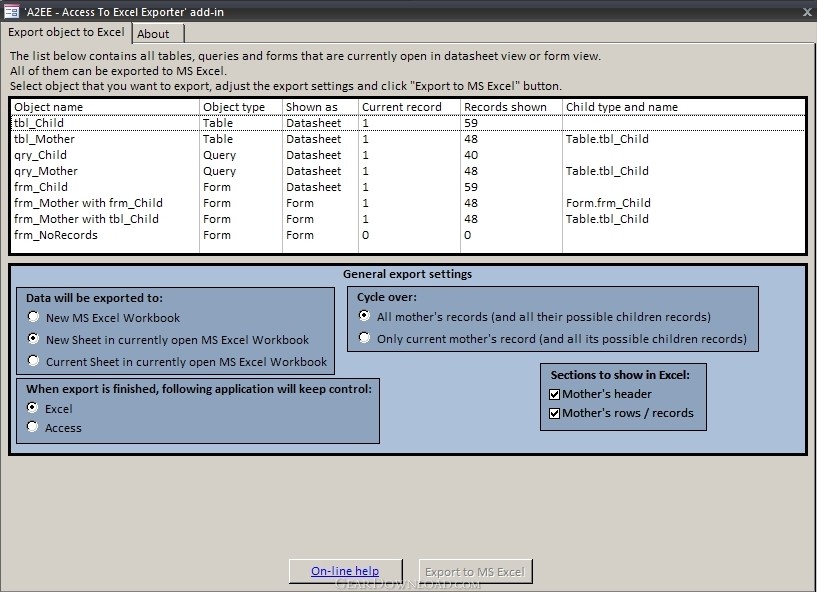 Click to enlarge screenshot
Software Description:
MultiLevelExporter - Exports Access forms with subforms and datasheets with subdatasheets into Excel
It is an add-in for Microsoft Access that enables exporting of following Microsoft Access structures into Microsoft Excel:
- Table with subdatasheet
- Query with subdatasheet
- Form in datasheet view with subdatasheet
- Form with subform
It may also said that it 'converts' above mentioned MS Access objects into MS Excel worksheets.
The result of such a conversion is that data from both parental level (Datasheet or Form itself) and all its children's levels (Subdatasheets or Subforms) get exported into MS Excel Worksheet while keeping the original Access-like drill-down view.
It is commonly being used when there is a need to:
* SHARE MS ACCESS DATA (DATASHEETS WITH SUBDATASHEETS OR FORMS WITH SUBFORMS) WITH NON-ACCESS USERS
You may need to distribute such data to people who aren't familiar with MS Access or don't have MS Access at all.
* PROTECT SENSITIVE ACCESS DATA
If your database contains sensitive data that you don't want to share, you may export and share only selected Tables, Queries or Forms and their children, and opt not not share remaining sensitive data.
* PROCESS MS ACCESS-ORIGINATING DATA IN MS EXCEL WHILE KEEPING PARENT-CHILD LAYOUT
After you export Access data organized in parent-child layout into MS Excel, you may further analyze and process them in MS Excel Worksheet in the ways that aren't available in MS Access (you may use MS Excel's graphs, formatting, forms, formulas and other MS Excel-specific features).
* PRINT OUT PARENT-CHILD TREE-LIKE STRUCTURE
It is not possible to print Datasheet with Subdatasheet or Form with Subform and the underlying data of both parent and children levels all at once directly from MS Access.
Nevertheless after you export parent-child tree-like organized data into MS Excel you may print it now from there easily.
* EXPORT 1:N DATA OF ANY NON-ACCESS DATABASE INTO EXCEL
* EXPORT DRILL-DOWN STRUCTURED DATA INTO VARIOUS OTHER FILE FORMATS
* SEND DATABASE DATA VIA EMAIL
What's New: Few new functions have been added.
Limitations: The Demo may be upgraded to Full version through purchasing of the Product Key
TAGS: export, convert, Access, database, form, Excel
It is an add-in for Microsoft Access that enables exporting of following Microsoft Access structures into Microsoft Excel:
- Table with subdatasheet
- Query with subdatasheet
- Form in datasheet view with subdatasheet
- Form with subform
It may also said that it 'converts' above mentioned MS Access objects into MS Excel worksheets.
The result of such a conversion is that data from both parental level (Datasheet or Form itself) and all its children's levels (Subdatasheets or Subforms) get exported into MS Excel Worksheet while keeping the original Access-like drill-down view.
It is commonly being used when there is a need to:
* SHARE MS ACCESS DATA (DATASHEETS WITH SUBDATASHEETS OR FORMS WITH SUBFORMS) WITH NON-ACCESS USERS
You may need to distribute such data to people who aren't familiar with MS Access or don't have MS Access at all.
* PROTECT SENSITIVE ACCESS DATA
If your database contains sensitive data that you don't want to share, you may export and share only selected Tables, Queries or Forms and their children, and opt not not share remaining sensitive data.
* PROCESS MS ACCESS-ORIGINATING DATA IN MS EXCEL WHILE KEEPING PARENT-CHILD LAYOUT
After you export Access data organized in parent-child layout into MS Excel, you may further analyze and process them in MS Excel Worksheet in the ways that aren't available in MS Access (you may use MS Excel's graphs, formatting, forms, formulas and other MS Excel-specific features).
* PRINT OUT PARENT-CHILD TREE-LIKE STRUCTURE
It is not possible to print Datasheet with Subdatasheet or Form with Subform and the underlying data of both parent and children levels all at once directly from MS Access.
Nevertheless after you export parent-child tree-like organized data into MS Excel you may print it now from there easily.
* EXPORT 1:N DATA OF ANY NON-ACCESS DATABASE INTO EXCEL
* EXPORT DRILL-DOWN STRUCTURED DATA INTO VARIOUS OTHER FILE FORMATS
* SEND DATABASE DATA VIA EMAIL
What's New: Few new functions have been added.
Limitations: The Demo may be upgraded to Full version through purchasing of the Product Key
TAGS: export, convert, Access, database, form, Excel
100% Clean:
 MultiLevelExporter 7.3 is 100% clean
This download (MultiLevelExporter.zip) was tested thoroughly and was found 100% clean. Click "Report Spyware" link on the top if you found this software contains any form of malware, including but not limited to: spyware, viruses, trojans and backdoors.
Related Software:
- MultiLevelExporter 7.3 - Exports Access forms with subforms and datasheets with subdatasheets into Excel
- SQLite Analyzer 3.0.4.27 - Process SQLite databases visually with SQLite Analyzer! Free trial!
- Full Convert Professional SQL Server Ed. 1.3 - Full Convert provides powerful and comfortable way to convert databases.
- Full Convert Standard SQL Server Edition 1.3 - Full Convert provides powerful and comfortable way to convert databases.
- Full Convert Standard MySQL Edition 1.3 - Full Convert provides powerful and comfortable way to convert databases.
- Full Convert Professional MySQL Edition 1.3 - Full Convert provides powerful and comfortable way to convert databases.
- Mobile Database Viewer(Access,xls,Oracle)for UIQ 1.1 - View Access,Foxpro,dBase,Excel and any ODBC enable Database on UIQ mobile phone.
- Cornolius Database Application 1.4.300 - A secure multi-user database creator and manager for individuals and businesses!
- DBConvert for Access & MySQL 6.0.0 - Bi-directional db conversion tool for MS Access and MySQL databases
- SQL Data Examiner 2010 R2 4.1.0 - SQL compare and synchronization for SQL Server, Oracle, MySQL, SQL Azure, Acces.
top 10 most downloaded


recommended software
-
- A VIP Organizer
- VIP Organizer is a time and task management software which uses To Do List method to help you get through more work spending less time. It increases y...

-
- Salon Calendar
- Salon Calendar is a software tool designed specially for hair salons, beauty, manicure or aesthetic shops, tanning salons, fitness studios, wedding sa...
